Appearance
Home Launcher
WebWorkstationMobileAfter you sign in, the Home Launcher lists the apps your role can open. Select a tile to start working; ask an administrator if an expected app is missing.
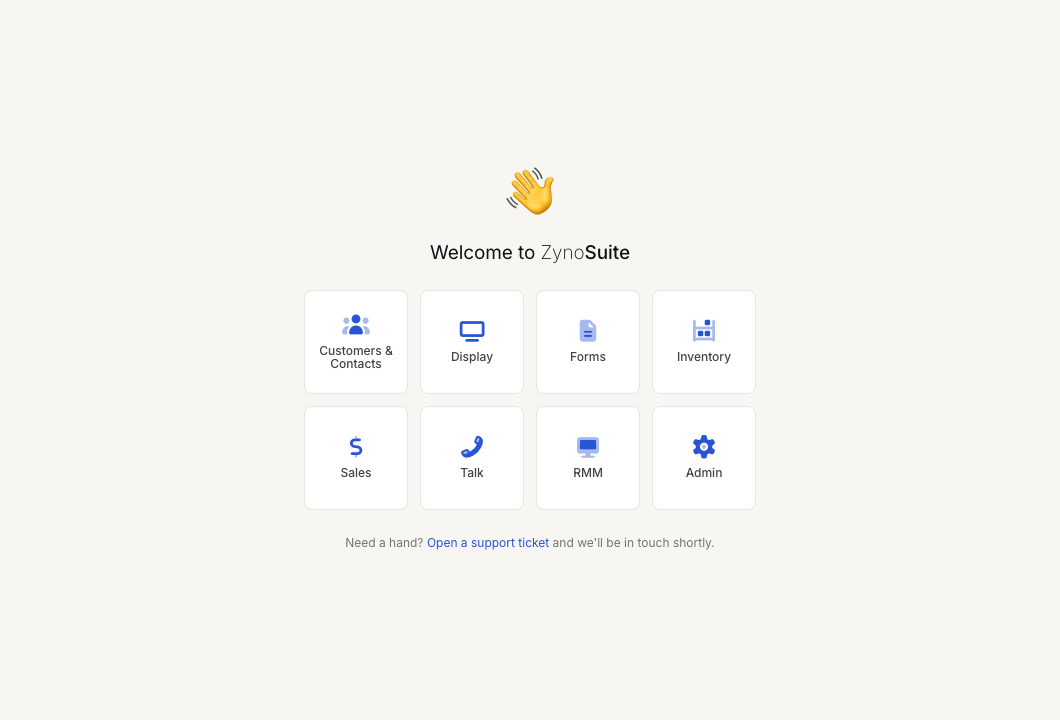
Open an app
- Sign in to ZynoSuite.
- On the launcher, select the app tile you want to open.
- ZynoSuite opens that app and shows its navigation in the sidebar.
The launcher only shows apps that your role and permissions allow. If you expect to see an app that is missing, contact your administrator.
Launcher apps
The launcher can include:
| App | What it is used for |
|---|---|
| Customers & Contacts (ZynoCRM) | Contact records, customer memberships, check-ins, files, notes, and customer history. |
| ZynoDisplay | Display and kiosk device management. |
| ZynoForms | Form submissions and form workflows. |
| ZynoHosting | Websites, domains, and hosting insights when enabled. |
| ZynoInventory | Inventory items, categories, stock tracking, and labels. |
| ZynoSales | Salespoint, bookings, products, transactions, reports, fulfillment, cash sessions, and closeouts. |
| ZynoTalk | Calls, voicemail, SMS, fax, and ZynoTalk reports. |
| ZynoRMM | Remote monitoring and management, if enabled for your account. |
| Admin | Organization setup and configuration. Visible only to administrators. |
Customers & Contacts and ZynoCRM
The launcher tile opens Customers & Contacts. Permissions, Features navigation, and some labels still say ZynoCRM for the same product. In these docs, Customers & Contacts is the primary user-facing name; ZynoCRM is the product name.
ZynoSales shortcuts
The ZynoSales launcher item can include shortcuts such as:
- Salespoint
- Bookings
- Gift Cards
- Products
- Reports
- Transactions
- Fulfillment
- Cash Sessions
- Daily Closeouts
If you do not have direct access to the main ZynoSales page but do have access to one of its shortcuts, the launcher opens the first available shortcut.
Return to the launcher
Select the ZynoSuite brand name in the sidebar to return to the Home Launcher.
On mobile web layouts, the top bar can also provide the navigation menu for returning to the launcher or moving between apps.
Support from the launcher
The launcher includes an Open a support ticket link. Use it when you need help and cannot find the answer in the docs.
Why apps may be missing
| Reason | What To Do |
|---|---|
| Your role does not include the app | Ask an administrator to review your role. |
| Your organization does not subscribe to the feature | Ask your administrator or account owner. |
| You are using the mobile layout | Some apps may be hidden when they are not mobile-ready. |
| You are not an administrator | The Admin app is hidden from non-admin users. |