Appearance
Customers & Contacts
WebWorkstationMobileLook up and manage people and companies, notes, files, cards on file, purchase history, check-ins, and memberships. The product is ZynoCRM; the launcher opens Customers & Contacts.
Permission required
You need ZynoCRM access in your role to use Customers & Contacts. Ask an administrator if you need access.
Getting there
Open Customers & Contacts from the Home Launcher or the Quick Action Bar (QAB).
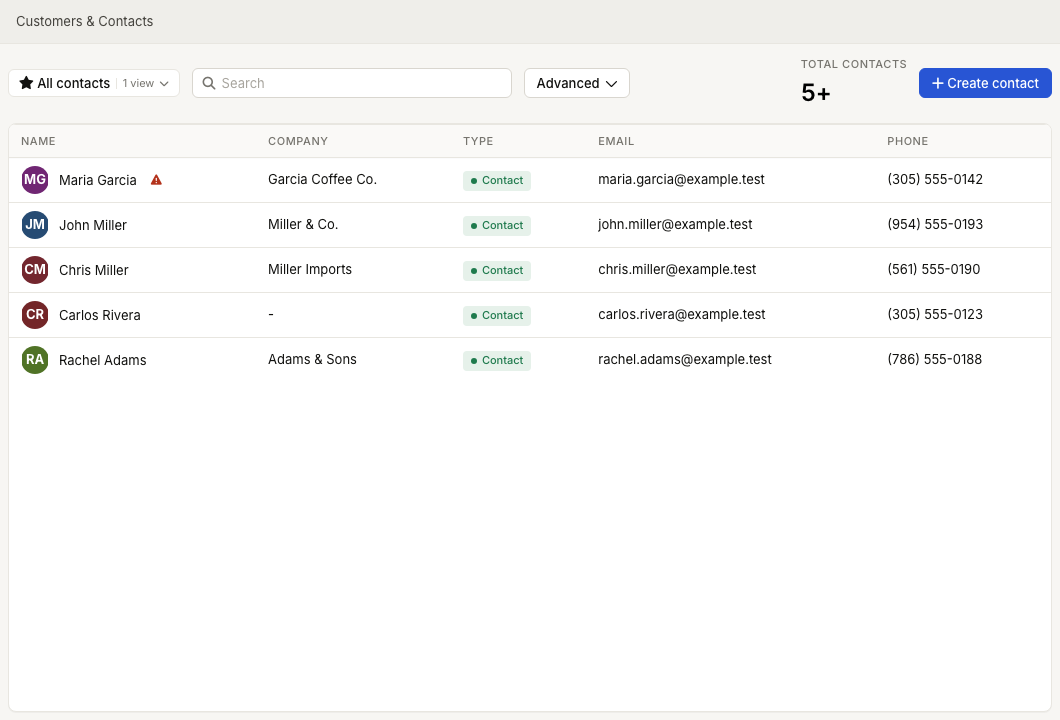
Contact management
The foundation of ZynoCRM is the contact list. You can create, search, filter, and open contact profiles from the main Customers & Contacts screen.
- Contact List - Browse and filter contact records from the Customers & Contacts screen.
- Creating Contacts - Add contacts manually with names, company, addresses, phone numbers, emails, alternate names, types, tags, marketing preference, birthdate, and zyno.id Keytag #.
- Editing Contacts - Update contact information, primary phone/email/address, avatar, alternate names, types, tags, and marketing preference.
- Searching - Find contacts quickly by name, phone, email, or other fields.
- Contact Tags - Apply named CRM labels for grouping and filtering contacts.
- zyno.id Keytags - Assign a physical keychain or barcode tag so members can scan their own Keytag and staff can pull up the profile for check-in.
- Exporting - Understand current export paths and alternatives.
Contact profiles
When you open a contact, you have access to a rich set of detail sections that give you a complete picture of that contact's history and relationship with your business.
- Profile Overview - View a summary of key contact information at a glance.
- Notes - Add and review timestamped notes, including alert notes.
- Files - Upload and manage files attached to a contact, organized by category.
- Payment Methods - View and manage stored payment methods for a customer, including cards on file.
- Transaction History - See a customer's full sales transaction history from ZynoSales.
- Saved Tabs - View in-progress Salespoint tabs attached to a customer.
- Form Submissions - View forms that a contact has submitted through ZynoForms.
- Relationships - Link family members, colleagues, businesses, and other related contacts.
- Merging Contacts - Combine duplicate records while retaining the survivor's profile and history.
Check-ins
Track contact arrivals through check-in notifications in the sidebar dock.
- Check-Ins - Understand where check-ins appear and how staff acknowledge them.
- Check-In Notifications - Respond to waiting check-ins from the sidebar dock.
Memberships
Memberships connect customers to paid programs with renewals, additional members, credit pools, and member discounts.
- Memberships Overview - Understand how the membership system works.
- Membership Programs - Define membership tiers and their associated benefits.
- Credit Pools - Assign recurring or one-time credit balances that members can spend at the point of sale.
- Member Discounts - Set up automatic discounts that apply when a member is associated with a transaction.
- Managing Members - Enroll contacts in programs, adjust memberships, and view member status.
- Renewals - Handle recurring membership renewal settings, catch-up charges, and renewal history.
Administration
Contact behavior and ZynoCRM configuration options are managed in the admin area.
- ZynoCRM Settings - Configure default phone, email, and address types plus person/company contact layout.
- CRM Tags - Create and maintain named contact labels.
- Contact Types - Configure the contact classifications available to your organization.
- Relationship Types - Configure the relationship labels available on contact profiles.
- File Categories - Manage the categories available for organizing contact files.
- Credit Pools (Admin) - Define reusable credit pool configurations for membership products.
Common issues
| Problem | What To Check |
|---|---|
| Customers & Contacts is missing from the launcher | Ask an administrator to review your ZynoCRM access and role permissions. |
| A contact cannot be created or edited | Confirm your role has contact edit access, then check Creating Contacts and Editing Contacts. |
| Search does not find the expected contact | Try name, phone, email, zyno.id Keytag #, and saved filters. See Searching & Filtering. |
| Check-in notifications do not appear | Confirm check-ins are enabled for your workflow and review Check-In Notifications. Workstation check-in behavior also depends on the local station setup. |
| Membership benefits do not apply in Salespoint | Confirm the customer is attached to the sale, the membership is active, and the related Member Discounts or Credit Pools are configured. |
| A file category is missing | Ask an administrator to review File Categories. |