Appearance
Quick Action Bar
WebWorkstationMobileUse the left sidebar (Quick Action Bar) for apps, phone and check-in status, help, and your account menu while you work. Rows appear only when they apply to your account.
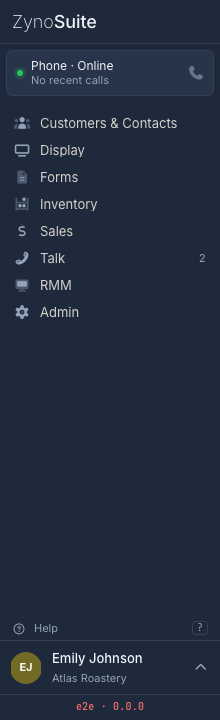
What you can do
| Area | What it does |
|---|---|
| Brand header | Returns to the Home Launcher. |
| Status dock | Shows phone status, incoming calls, waiting check-ins, and notification setup prompts when relevant. |
| App navigation | Lists the apps and shortcuts your account can access. |
| Update row | Shows Update available when the app needs to reload to apply an update. |
| Help row | Opens support/help. |
| User strip | Opens account actions such as password, fingerprints, organization switching, and logout. |
Not every row appears all the time. ZynoSuite hides controls that are not relevant to your account, platform, or current state.
Phone status
If your account can use the ZynoTalk softphone and you are not in the mobile layout, the status dock can show a phone row.
The row may show:
- Online when the softphone is ready.
- Incoming when a call is ringing.
- On call during an active call.
- The active or primary extension when available.
Incoming call rows include accept and decline controls.
Check-ins
When contacts are waiting for check-in acknowledgement, the dock shows a check-in row such as 1 check-in waiting or 3 check-ins waiting.
Select the row to open the check-in popover. Acknowledging a check-in removes it from the waiting count.
Notifications
If browser notifications are needed, the dock can show a Notifications row.
| State | Meaning |
|---|---|
| Select to enable | Notifications are available but not enabled yet. Select the row and allow browser notifications. |
| Blocked by browser | Your browser is blocking notifications. Select the row to open browser-specific help. |
Workstation does not use browser notification prompts in the same way as the web app.
App navigation
The sidebar app list uses the same app source as the Home Launcher. You see only apps and subapps your account can access.
Common app names include:
- Customers & Contacts
- ZynoDisplay
- ZynoForms
- ZynoInventory
- ZynoSales
- ZynoTalk
- ZynoRMM, if enabled
- Admin, for administrators
For ZynoSales, the sidebar can show subapps such as Salespoint, Bookings, Products, Transactions, Fulfillment, Cash Sessions, and Daily Closeouts.
User menu
Select your user strip at the bottom of the sidebar to open account actions. Depending on your platform and permissions, you may see:
- Change Password
- Manage Fingerprints
- Switch Tenant
- Logout
If you are impersonating another user or organization, the user strip shows an impersonation state. Users with permission can exit impersonation from that area.
Updates and help
When Update available appears, select Restart to reload the app and apply the update.
Select Help to open support resources.
Common issues
| Problem | What To Check |
|---|---|
| A sidebar app is missing | Confirm your role includes access to that app. |
| ZynoTalk phone status is missing | Confirm ZynoTalk access and softphone setup. It is hidden in mobile layout. |
| Check-ins are not visible | The check-in row appears only when there are waiting check-ins for the current location. |
| Notifications are blocked | Update browser site permissions for ZynoSuite. |
| Switch Tenant is missing | Organization switching is hidden on Workstation and when your account has only one organization. |