Appearance
ZynoTalk
WebWorkstationPlace and review calls, handle voicemail, SMS, and fax, and run communication reports. Open ZynoTalk from the launcher; tabs and numbers depend on your access.
Permission required
ZynoTalk access is managed per phone number and per extension. If a tab is missing or a number is not available, an administrator may need to grant access in ZynoTalk Numbers.
ZynoTalk Mobile
The main ZynoTalk workspace is available in ZynoSuite Web and Workstation. Mobile calling uses the separate ZynoTalk Mobile app. See ZynoTalk Setup and ZynoTalk Calling.Getting there
Open ZynoTalk from the Home Launcher or sidebar. The ZynoTalk workspace shows the tabs your account can use:
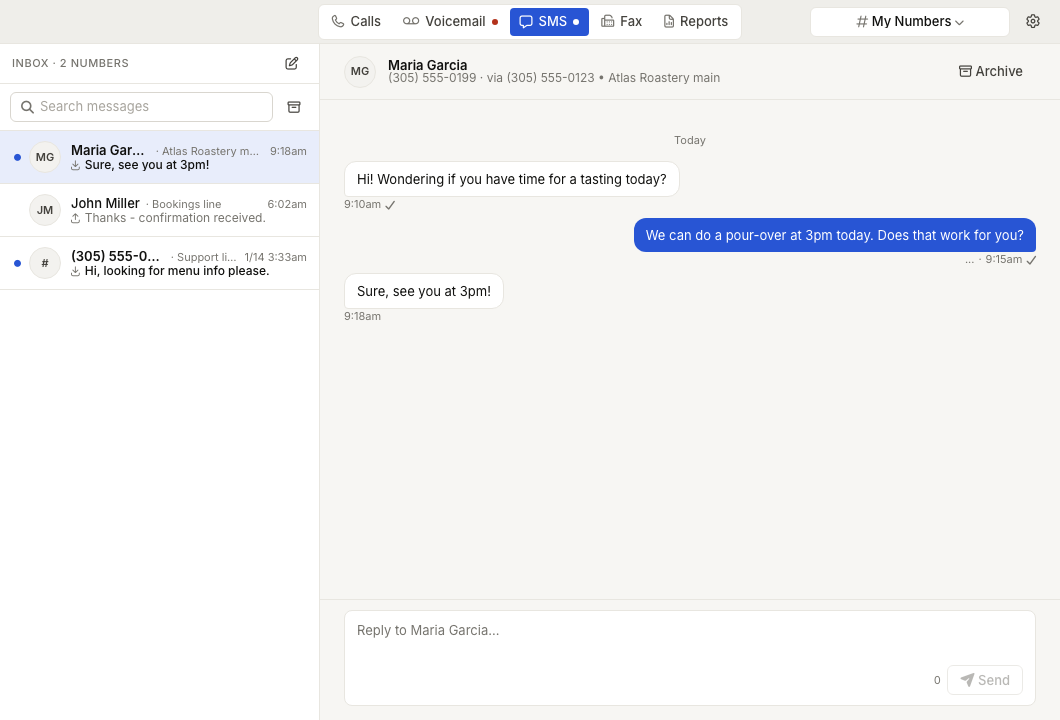
- Calls - call history, recordings, transcripts, summaries, and share links.
- Voicemail - voicemail messages for voicemail-enabled extensions.
- SMS - text conversations for messaging-enabled numbers.
- Fax - digital fax inbox, sent faxes, and fax sending.
- Reports - call, text, and fax activity reporting.
Unread indicators appear on the Voicemail, SMS, and Fax tabs when there is new activity.
Choosing your scope
Most ZynoTalk tabs use the number and extension selector in the header. The selector can show My Numbers, All Numbers, or an individual number or extension depending on the tab and your access.
The selector filters each tab to the communication channel it supports. For example, SMS only shows messaging-enabled numbers, Fax only shows digital fax numbers, and Voicemail only shows voicemail-enabled extensions.
See Number Selector for details.
Calls
- Call History - search, filter, sort, and open call records.
- Making Calls - place outbound calls from the phone dock.
- Softphone - use browser audio, desk phone mode, mute, hold, keypad, and audio device selection.
- Call Transfer - transfer an active call to another extension.
- Call Recording - play, share, and download available recordings.
- AI Transcription & Summary - review call transcripts, AI summaries, and table synopses.
Messages
- Voicemail - listen to messages, mark them new or saved, and delete messages.
- Voicemail Transcription - read available voicemail transcripts.
- SMS Conversations - send new texts, reply to conversations, archive threads, and manage read state.
- Fax - send PDF faxes, preview cover sheets, retry failures, view received faxes, and archive completed faxes.
Preferences and reports
- Notification Preferences - choose browser notifications, mobile notifications, and mobile call routing.
- ZynoTalk Reports - review call, text, and fax activity by date, number, or extension.
Administration
ZynoTalk administrators configure the inventory and access that users see in ZynoTalk:
- ZynoTalk Numbers - manage telephone numbers, extensions, routing, voicemail greetings, e911 location, and access.
- Phones - assign and manage physical phones and endpoint configurations.
Common issues
| Problem | What To Check |
|---|---|
| ZynoTalk is missing from the launcher | Ask an administrator to confirm ZynoTalk access and phone-number or extension assignments. |
| A number or extension is missing | Review Number Selector and ask an administrator to check Numbers & Access. |
| Softphone calls have no audio | Check browser microphone permission, audio device selection, and Softphone. Try Workstation or a supported browser if audio remains blocked. |
| SMS, Fax, or Voicemail tabs are missing | Confirm the selected number or extension supports that channel and your user has access. See SMS Conversations, Fax, and Voicemail Inbox. |
| Recordings, transcripts, or summaries are missing | Confirm the call has recording/transcription available and review Call Recording and AI Transcription & Summary. |
| Mobile calls are not routing to the phone | Check Notification Preferences and ZynoTalk Mobile Setup. |