Appearance
ZynoTalk Reports
WebWorkstationReview call, text, and fax activity for the numbers and extensions you can access.
Permission required
Report options depend on your ZynoTalk access. If you do not have access to calls, texts, or faxes, those report types are hidden.
Open a report
- Open ZynoTalk > Reports.
- Choose a date range. The default range is the last 30 days.
- Choose a view mode.
- Choose the report type.
- Apply an entity filter when available.
Report settings are saved in your browser preference and can also be reflected in the page URL.
Report views
| View | Use It For |
|---|---|
| By Date | Daily totals across the selected date range. |
| By Number or By Extension | Totals grouped by communication number or extension. |
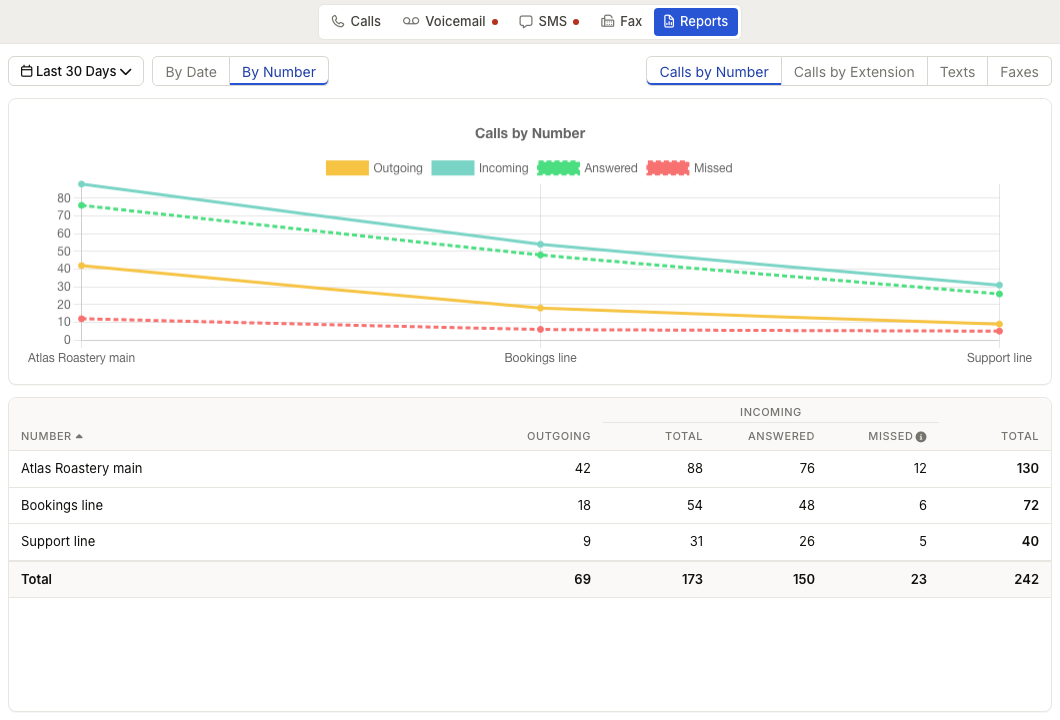
Calls can be reported as Calls, Calls by Number, or Calls by Extension depending on the view. Texts and faxes can be reported as Texts, Faxes, or number-based totals.
Table columns
Call reports can include outgoing calls, incoming total, incoming answered, incoming missed, internal calls, and total. Missed-call totals count calls that rang for at least 6 seconds.
SMS and fax reports show sent, received, and total counts.
The table includes sortable columns and a totals row.
Chart behavior
Reports can include a chart above the table. Use the legend to hide or show datasets such as outgoing, incoming, answered, missed, internal, sent, or received without changing the table.
Common issues
| Problem | What To Check |
|---|---|
| A report type is missing | Confirm your access includes that channel. |
| The table is empty | Change the date range or entity filter. |
| Data failed to load | Refresh the page and try again. |
| Internal calls affect totals | Use the internal call column control when available. |