Appearance
Call History
WebWorkstationThe Calls tab shows call detail records for the numbers and extensions you can access.
Permission required
You need call history access for at least one number or extension. Recordings require separate call recording access.
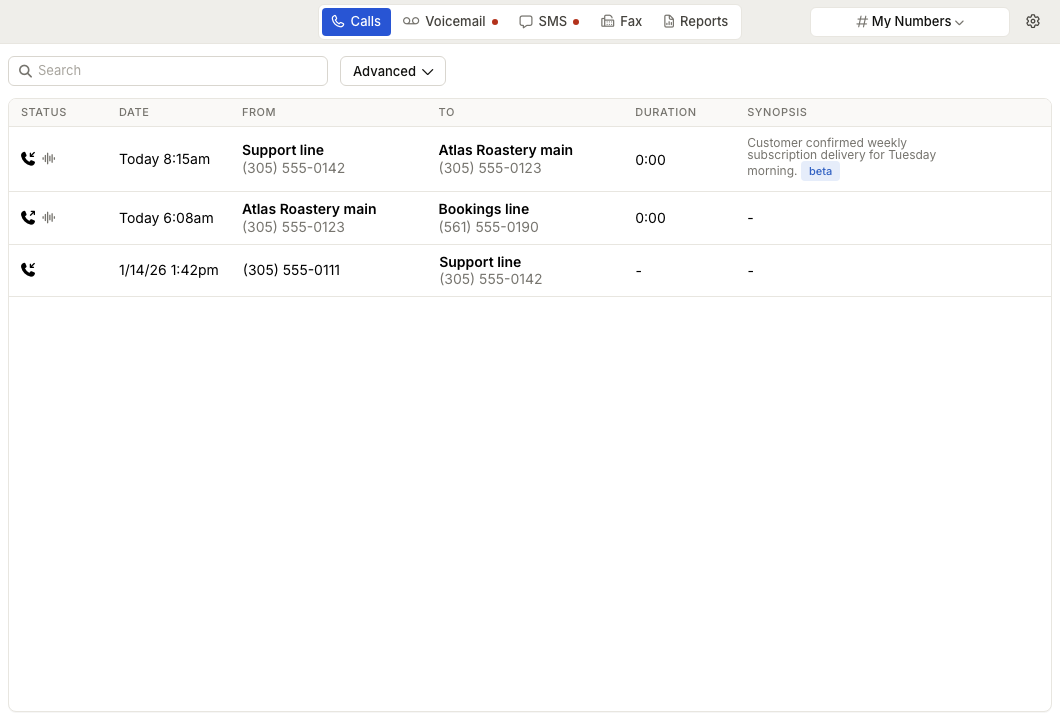
Review calls
- Open ZynoTalk > Calls.
- Use the number selector to choose My Numbers, All Numbers, or a specific number or extension.
- Review the call rows.
The table shows call status, date, caller, recipient, duration, and any available synopsis. Date, caller, recipient, and duration can be sorted.
Search and filter
Use Search to find matching phone numbers or call details. Phone-number searches can be typed with or without punctuation.
Use Advanced to filter by:
- Direction: any, incoming, or outgoing.
- Answered status: any, answered, or missed.
- Date range: on, after, or before a date.
Filters apply to the current selector scope.
Open a recording
If a call has a recording and you have permission, select the row to expand the recording panel. From there you can play the audio, review transcript and summary content when available, copy a share link, or download the recording after the waveform is ready.
Share a call
Use the share action on an expanded call to copy a link to that call. The link opens the Calls tab with that call selected for users who have permission to view it.
Empty states
| Message | What It Means |
|---|---|
| No call history | There are no calls in the selected scope. |
| No matches | The search or filters did not match any calls. |
| Call not found | A shared call link points to a call your account cannot view or that no longer exists. |
| No access | Your account does not have call history access for any number or extension. |
| Not set up | ZynoTalk has not been set up for your organization. |