Appearance
SMS Conversations
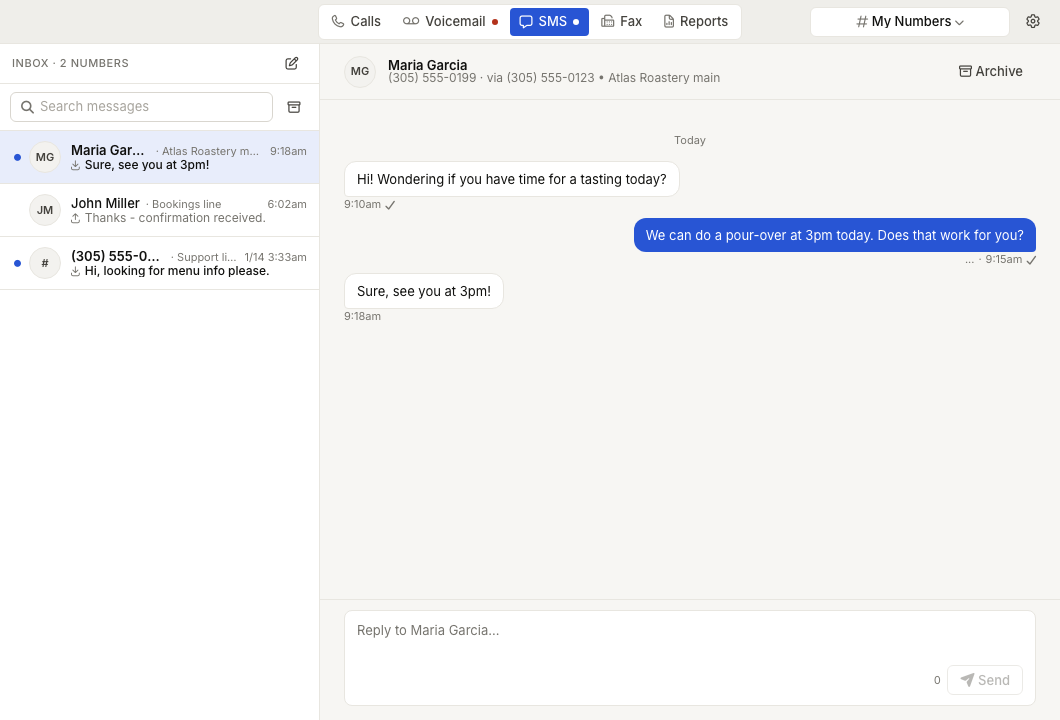
WebWorkstationThe SMS tab is a conversation inbox for messaging-enabled ZynoTalk numbers.
Permission required
You need SMS access to at least one messaging-enabled number. Archived messaging numbers may be available for history but not for new sending.
Open conversations
- Open ZynoTalk > SMS.
- Use the selector to choose the number scope.
- Select a conversation from the left pane.
- Read and reply in the message pane.
The conversation list shows Inbox or Archived, unread state, the contact or phone number, the local ZynoTalk number, recent message preview, direction, time, and failed-send warnings.
Search conversations
Use the search field above the conversation list. Phone numbers can be searched with or without punctuation. Clear the search to return to the full list.
Start a new conversation
- Select the new conversation action.
- Choose Send from.
- Enter one or more 10-digit destination numbers in Send to. Separate multiple numbers with commas.
- Enter the message.
- Send the conversation.
Only active messaging-enabled numbers can send new SMS messages.
Reply to a conversation
- Open the conversation.
- Type in the reply box.
- Select Send or press Enter.
Use Shift+Enter to add a new line. If the remote party has opted out or the local number can no longer send SMS, the reply box is disabled.
Archive and read state
- Use the archive control to move a conversation out of the active inbox.
- Use View archived to review archived conversations, then Unarchive when the conversation should return to the active inbox.
- Mark a conversation read or unread with the unread dot in the conversation list.
Common issues
| Problem | What To Check |
|---|---|
| New conversation is not available | The selected scope may not include any active messaging-enabled numbers. |
| A reply cannot be sent | The local number may no longer be messaging-enabled, or the remote party may have opted out. |
| A conversation is missing | Check the archived view and clear search filters. |
| A send failed | Open the conversation and review the failed-send indicator before retrying or contacting the contact another way. |