Appearance
Profile Overview
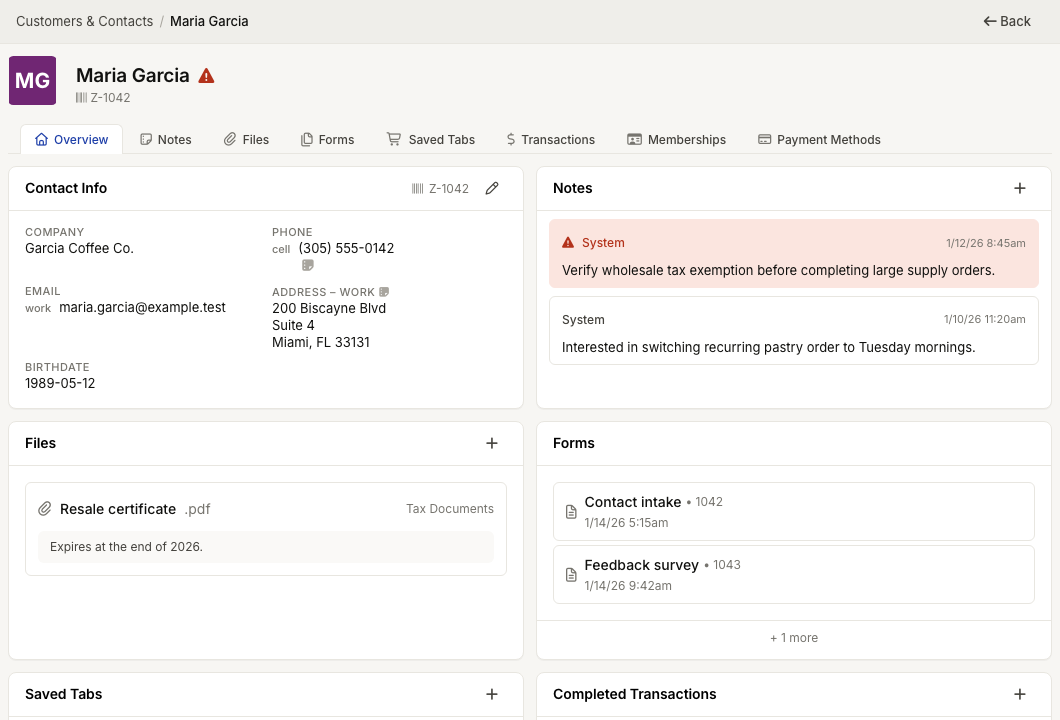
WebWorkstationMobileThe contact profile brings the contact's contact information, tags, types, relationships, notes, files, forms, saved tabs, transactions, memberships, and payment methods into one place.
Permission required
You need ZynoCRM access to open contact profiles. Some sections also require separate ZynoCRM, ZynoSales, or ZynoForms permissions.
Profile header
The top of the profile shows:
- Contact name or company name.
- Avatar.
- zyno.id Keytag # when one is saved (physical keychain or barcode the member scans so staff can open the profile for check-in—not a CRM label).
- Contact types and named CRM tags when they are assigned.
- Alert indicator when the contact has alert notes.
- Back button to return to the contact list or previous screen.
Users with CRM edit access can select the contact name or contact info edit button to update the profile.
Overview cards
The Overview tab shows compact cards for the sections you can access. Cards can include:
- Contact Info
- Notes
- Files
- ZynoForms
- Saved Tabs
- Completed Transactions
- Memberships
- Payment Methods
Select a card, or the matching folder tab, to open the full section.
Folder tabs
Available tabs depend on permissions:
| Tab | Requires |
|---|---|
| Notes | CRM notes read access |
| Files | CRM files read access |
| ZynoForms | ZynoCRM forms read access |
| Saved Tabs | Salespoint access |
| Transactions | ZynoSales transaction view access |
| Memberships | CRM memberships read access |
| Payment Methods | CRM payment methods read access |
| Relationships | ZynoCRM access; editing requires CRM edit access |