Appearance
Permissions Reference
Look up what each permission group controls. Options match Admin > Identity & Access > Permissions, grouped by application.
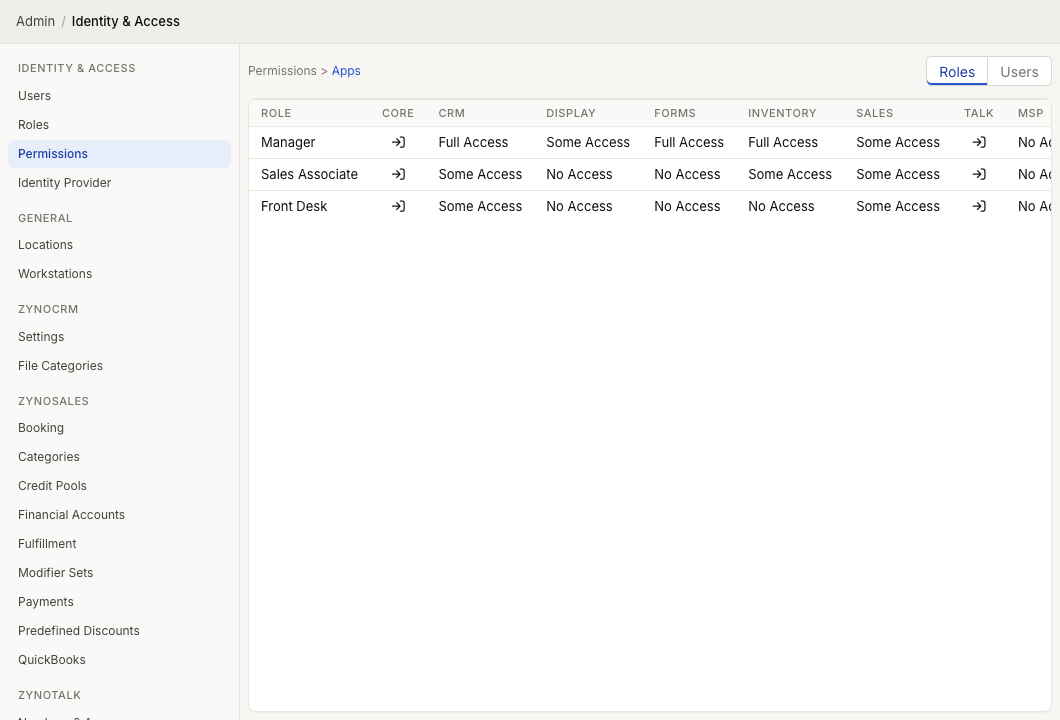
For an explanation of how roles, users, direct grants, and the admin flag interact, see the Permissions admin guide.
Core
Core permissions control account actions that are not tied to one app.
| Permission Group | Options | What It Controls |
|---|---|---|
| Change Own Password | No Access, Allowed | Allows the user to change their own direct ZynoSuite password. |
| Manage Own Fingerprints | No Access, Allowed | Allows the user to enroll and remove their own fingerprints for ZynoWorkstation sign-in. |
ZynoCRM
ZynoCRM permissions control contact records and the tabs inside a contact profile.
| Permission Group | Options | What It Controls |
|---|---|---|
| Customers & Contacts | Read Only; Read & Create; Read, Create & Edit | Opens contact records, creates new contacts, and edits contact details when edit access is granted. |
| Notes | No Access; Read Only; Read & Create; Read, Create & Edit | Shows, creates, edits, and deletes notes on a contact record. |
| Files | No Access; Read Only; Read & Create; Read, Create & Edit | Shows, uploads, edits, and deletes files attached to a contact record. |
| Form Submissions | No Access; Read Only | Shows submitted forms linked to a contact record. |
| Memberships | No Access; Read; Read & Edit | Shows contact membership details and allows membership changes when edit access is granted. |
| Payment Methods | No Access; Read Only; Read & Create; Read, Create & Edit | Shows, adds, edits, and removes saved payment methods on a contact record. |
Some ZynoCRM permissions depend on another application also being available for the organization. For example, contact form submissions require ZynoForms access, and memberships and payment methods depend on ZynoSales access.
ZynoSales
ZynoSales permissions control Salespoint, bookings, products, reporting, fulfillment, transactions, and related sales workflows.
| Permission Group | Options | What It Controls |
|---|---|---|
| Salespoint | No Access; On ZynoWorkstation installs; On any device | Opens Salespoint. The On ZynoWorkstation installs option requires a ZynoWorkstation install; any-device access also allows browser and mobile Salespoint use. |
| Discounts | Unrestricted Pre-defined Discounts Only; All Pre-defined Discounts; Pre-defined & Custom Discounts | Controls which discounts the user can apply in Salespoint. This setting applies when the user also has Salespoint access. |
| Open Cash Drawer | No Access; Allowed | Allows the user to open a configured cash drawer from Salespoint when using ZynoWorkstation and cash payments are enabled. |
| Gift Cards | No Access; Read Only | Opens gift card records, balances, and history. |
| Products | No Access; Read Only; Read & Edit | Opens the product catalog and allows product creation or editing when edit access is granted. |
| Reports | No Access; Read Only | Opens ZynoSales Reports, Cash Sessions, and Daily Closeouts. |
| Transactions | No Access; Read Only; Read & Modify | Opens transaction lists and details. Modify access allows transaction actions such as refunds, cancellations, and adjustments. |
| Fulfillment | No Access; Read Only; Read & Modify | Opens fulfillment queues and order details. Modify access allows shipment, pickup, batch, label, and fulfillment-status actions. |
| Bookings | No Access; View Own; View & Modify Own; View All; View All, Modify Own; View & Modify All | Opens ZynoSales Bookings and controls whether the user can see or modify only their assigned bookings or all bookings. Modify access can also open Salespoint for booking-focused work even without full ZynoSales access. |
::: note E-commerce visibility depends on organization settings and feature access. The current Permissions screen does not expose a separate E-Commerce permission row. :::
ZynoTalk
ZynoTalk access is managed outside the global permission grid. In the Permissions screen, ZynoTalk points administrators to the ZynoTalk admin area because phone access is assigned per number and per extension.
Use Numbers & Access to control which users or roles can access each number or extension. The exact ZynoTalk actions available to a user depend on the number or extension access granted there.
ZynoInventory
ZynoInventory permissions control item maintenance and stock counts.
| Permission Group | Options | What It Controls |
|---|---|---|
| Edit Inventory | No Access; Update Quantities; Create, Edit & Delete Items | Allows stock quantity updates, or full item maintenance including creating, editing, deleting items, and updating quantities. |
Users with ZynoInventory application access but no edit option can open inventory and review item information without changing records.
ZynoForms
ZynoForms access controls opening the ZynoForms submissions workspace. The current Permissions screen does not expose individual form creation or editing rows.
Form definition changes are handled through your organization's form-management process. For day-to-day use, staff use ZynoForms to review submitted forms and exports that are available to their role.
ZynoDisplay
ZynoDisplay permissions control setup and configuration for registered display devices.
| Permission Group | Options | What It Controls |
|---|---|---|
| Register Device | No Access; Allowed | Allows the user to register a new display device with the organization. |
| Configure Displays | No Access; Allowed | Allows the user to rename display devices and assign None, ZynoForm, or Web View content. |
MSP
MSP permissions apply only to managed service provider accounts that administer multiple ZynoSuite organizations.
| Permission Group | Options | What It Controls |
|---|---|---|
| Sign into Client Tenant | No Access; Allowed | Allows access to the MSP administration area for managed client organizations. |
| Impersonate Client Users | No Access; Allowed | Allows the MSP user to act as a user inside a managed client organization when impersonation is available. |
ZynoRMM technician authorization, endpoint scope, manager access, and secure-action authenticators are managed within the RMM context rather than this global permissions grid. See Technicians and Access.