Appearance
CSV Import
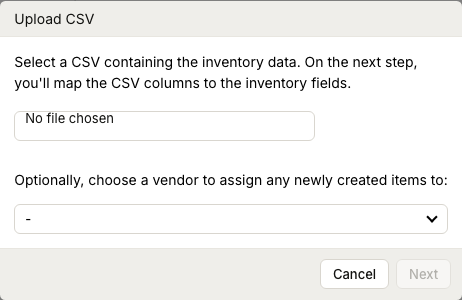
WebWorkstationUse CSV import to add or update many inventory items at once.
Permission required
You need inventory edit permission to upload and import CSV files.
Import a CSV
- Open ZynoInventory.
- Select Upload CSV.
- Choose the CSV file.
- Optionally choose or create a vendor for newly created items.
- Select Next.
- Map CSV columns to inventory fields.
- Review and clean any data issues.
- Review the import preview.
- Uncheck any row you do not want to import.
- Select Upload.
The import modal moves through Upload CSV, column mapping, cleanup, and review. Use Back if you need to correct an earlier step before uploading.
Supported columns
You can map CSV columns to:
- Quantity
- UPC
- Vendor SKU
- Name
- Cost
- MSRP
- MAP
Column mapping rules
- If you do not map a quantity column, each imported row is treated as quantity 1.
- If you do not map UPC or Vendor SKU, each row can create a new item.
- You must map at least one of Vendor SKU, UPC, or name.
- A mapped field can only be assigned to one CSV column.
- Use First row contains headers when the first CSV row is labels instead of item data.
Data cleanup
The cleanup step identifies invalid values. You can edit cells, use Show only rows with issues, or exclude rows. Any remaining invalid cells are cleared during import. If a row no longer has UPC, Vendor SKU, or name after cleanup, it is excluded.
UPCs must be 12 or 13 digits, prices must be numeric with up to two decimal places, and quantities must be whole numbers. UPC values with at least 10 digits may be padded to 12 digits during cleanup.
Preview
The preview shows whether each row matches an existing item or will create a new item. Matching uses UPC first, then Vendor SKU. Changes to existing items are highlighted. Quantities on existing items are added as positive adjustments.
Common issues
| Problem | What To Check |
|---|---|
| Upload cannot continue | Confirm a CSV file is selected and at least one identifying column is mapped. |
| Existing items are not matched | Include UPC or Vendor SKU values that already exist in ZynoInventory. |
| Prices are rejected | Use numeric values with up to two decimal places. |
| UPCs are rejected | Use 12-digit UPCs or 13-digit EANs. |
| A row is skipped | Check whether it was unchecked or lost all identifying fields during cleanup. |