Appearance
Creating & Editing Items
WebWorkstationMobileCreate a standalone inventory item when you need to track stock that is not already linked to a ZynoSales product.
Permission required
You need inventory edit permission to create, edit, or delete items.
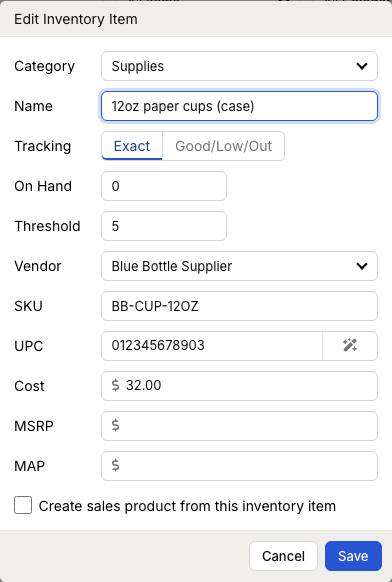
Create an item
- Open ZynoInventory.
- Select Create Item.
- Choose a Category or type a new category name.
- Enter a Name.
- Choose Tracking: Exact or Good/Low/Out.
- Enter the On Hand quantity or status.
- For exact tracking, optionally enter a Threshold.
- Choose a Vendor or type a new vendor name.
- Enter SKU, UPC, cost, MSRP, and MAP when needed.
- Save.
Create a ZynoSales product from an item
When creating a standalone item, enable Create sales product from this inventory item to open the ZynoSales product editor. If you complete the product setup, the inventory item becomes linked to the product.
Edit an item
- Open ZynoInventory.
- Select the item row.
- Update the fields.
- Save.
If the item is linked to a ZynoSales product, ZynoSuite opens the ZynoSales product editor instead. ZynoInventory fields for linked items are managed through that product.
UPC options
Enter a 12-digit UPC or 13-digit EAN. You can also use the auto-generate control, which shows Auto-generated in the UPC field.
If you scan a barcode while the item editor is open and the item is not linked to a ZynoSales product, the scanned code fills the UPC field.
Delete an item
Use the row action menu and choose Delete. ZynoSuite asks for confirmation.
You cannot delete an inventory item that is linked to a ZynoSales product. Disable inventory tracking or unlink it from the ZynoSales product first.