Appearance
Voicemail Inbox
WebWorkstationThe Voicemail tab lists messages for voicemail-enabled extensions you can access.
Permission required
You need voicemail access for at least one voicemail-enabled extension.
Review messages
- Open ZynoTalk > Voicemail.
- Use the selector to choose My Numbers, All Numbers, or a specific extension.
- Select a voicemail row to open playback.
The inbox shows the caller, message duration, received time, and unread state. If more than one extension is in scope, the table also shows the extension.
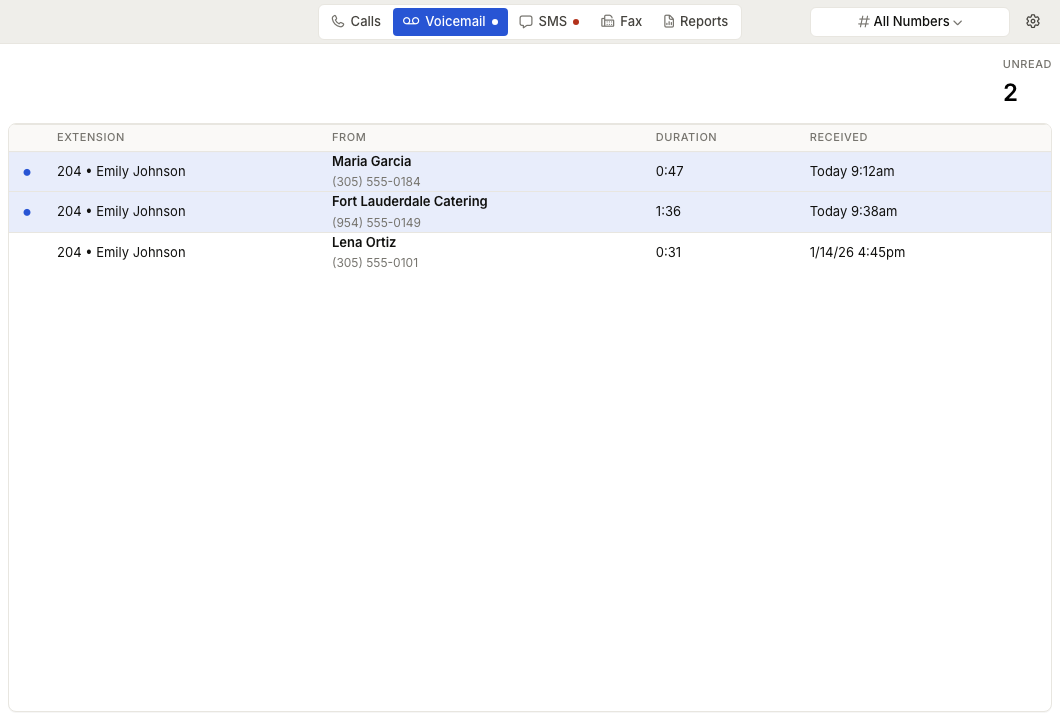
Mark new or saved
Use the dot control on a voicemail row to change its state:
- New messages count toward the Unread total.
- Saved messages remain in the inbox but no longer count as unread.
The row action changes between Mark as new and Mark as saved based on the current message state.
Delete a voicemail
Use the delete action on the row. ZynoSuite asks for confirmation before deleting. Deleted voicemail is removed from the inbox.
Empty states
| Message | What It Means |
|---|---|
| No voicemails | No messages exist in the selected scope. |
| No access | Your account does not have voicemail access. |
| No voicemail-enabled extensions | Your organization has no voicemail extension available to your account. |