Appearance
Scheduling & Dayparting
WebWorkstationSchedules let a screen change content through the day — a breakfast menu in the morning, lunch at midday, a promo loop in the evening. This is often called dayparting. A screen falls back to its default content whenever no schedule applies.
Permission required
You need the Configure Displays permission. See Permissions & Troubleshooting.
Where schedules live
You can add schedule rules in two places:
- On a screen — open the device, go to the Screens tab, select the screen, and open its Schedules.
- On a group — open a group and add schedules there, so every screen in the group follows them.
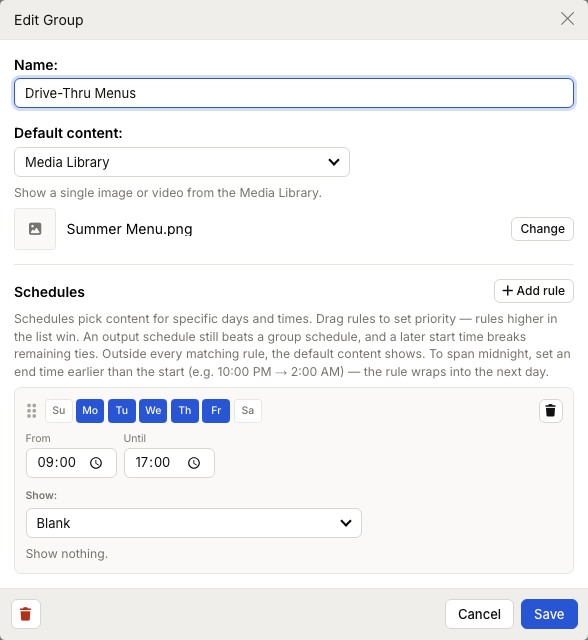
Building a rule
Each rule has:
- Days of week — toggle the days it applies to (for example, Mon–Fri).
- From / Until — the time window during the day.
- Show — the content to play in that window (a playlist, media, web page, blank, and so on).
Add as many rules as you need with Add rule, and remove any with its delete control.
Priority
When two rules could match at the same moment, priority decides which wins. Rules are ordered in the list — drag them to set priority, with higher rules winning. If a tie remains, the rule with the later start time wins. Outside every matching rule, the screen shows its default content.
Spanning midnight
To run content across midnight, set the Until time earlier than the From time — for example 10:00 PM → 2:00 AM. The rule wraps into the next day.
Time zone
Schedules run in the device's local time, which comes from the Location set on the device. If schedules fire at the wrong time, check the device's location on its Identity tab.
How schedules fit in
A live override always beats a schedule, and a screen's own schedule beats a group schedule. For the complete picture, see How ZynoDisplay Works.
Common issues
| Problem | What To Check |
|---|---|
| Content changes at the wrong time | Check the device Location (it sets the time zone). |
| Two rules overlap | The higher‑priority rule wins; drag rules to reorder them. |
| An overnight window doesn't work | Set Until earlier than From so the rule wraps past midnight. |
| The screen is blank between windows | Set a screen or group default to cover times no rule matches. |