Appearance
Payment Methods
WebWorkstationPayment Methods control which tenders you can use in Salespoint. Use this page to turn standard payment methods on or off and to create custom payment methods for business-specific workflows.
Open Admin > ZynoSales > Payments, then select the Payment Methods tab.
Standard payment methods
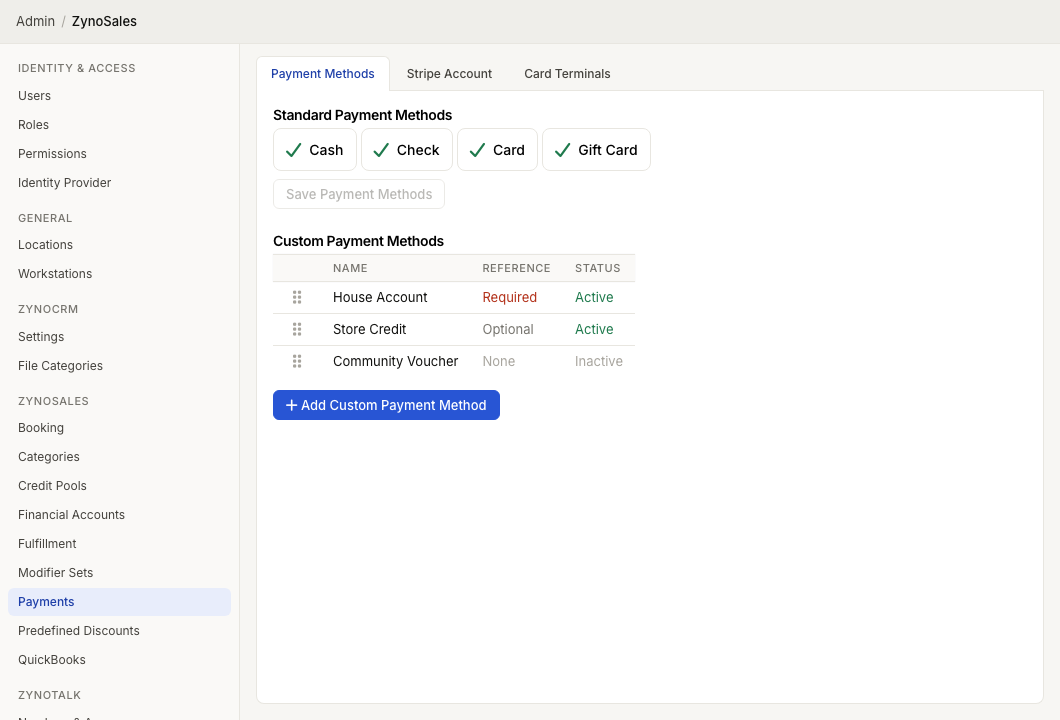
The Standard Payment Methods section includes four toggles:
| Method | Enables |
|---|---|
| Cash | Cash payments and cash refund recording |
| Check | Check payments and check references |
| Card | Card payments through Stripe account, terminals, readers, keyed cards, and saved cards |
| Gift Card | Gift card redemption in Salespoint |
Select a method to toggle it on or off, then select Save Payment Methods.
Changes affect which options appear in Salespoint payment flows. They do not rewrite historical transactions.
Custom payment methods
Custom payment methods let staff record payments that are not one of the built-in types. Common examples include:
- House account
- Store credit
- Voucher
- Comp
- External financing
- Money order
The custom-method table shows each method's Name, Reference requirement, and Status.
Add a custom payment method
- Select Add Custom Payment Method.
- Enter the display Name.
- Choose the Reference # requirement.
- Select Create.
Reference behavior can be:
| Reference # | Behavior |
|---|---|
| None | Staff are not asked for a reference number |
| Optional | Staff may enter a reference number |
| Required | Staff must enter a reference number before completing the payment |
Use a required reference for methods that must reconcile to an outside system, such as a voucher number, authorization number, or house-account approval.
Edit, disable, or delete a custom method
Select a custom method row to edit it.
- Update Name when the staff-facing label should change.
- Change Reference # when reconciliation needs change.
- Clear Active to hide the method from new payments without deleting it.
- Use the delete icon only when the method should be removed from configuration.
Inactive methods are not available for new payments, but existing transactions still keep their recorded payment history.
Sort custom methods
Drag custom methods by the handle in the table to change their order. The order controls how custom methods are presented to staff in payment workflows.