Appearance
Card Terminals
WorkstationCard Terminals are physical Stripe terminals used for in-person card payments from ZynoWorkstation. They are different from mobile card readers, which are connected from ZynoSuite Mobile.
Open Admin > ZynoSales > Payments, then select the Card Terminals tab.
Before you register a terminal
Make sure:
- Your Stripe Account is active.
- Card is enabled under Payment Methods.
- The location where the terminal will be used already exists under Locations.
- The terminal device is powered on, connected to the network, and showing a registration code.
Terminal list
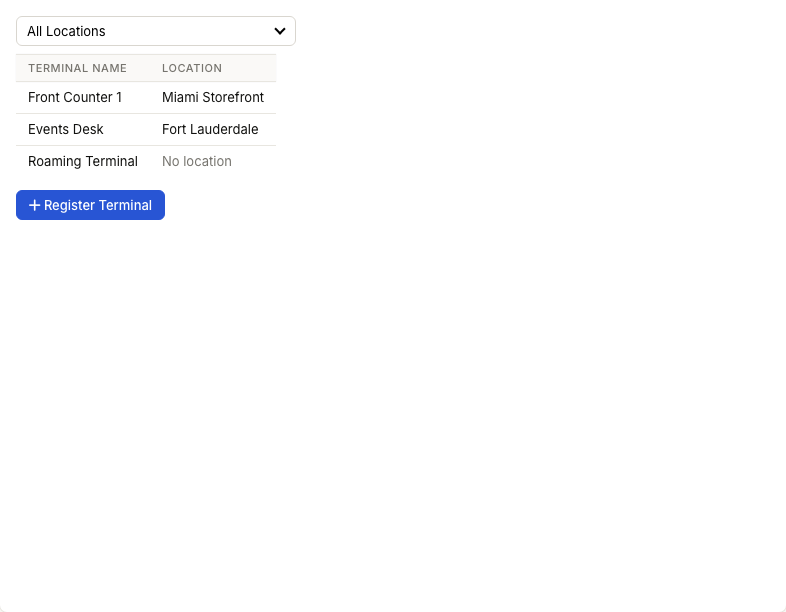
The Card Terminals page shows:
| Column | Meaning |
|---|---|
| Terminal Name | The friendly name staff see for the terminal |
| Location | The location assigned to the terminal |
Use the location filter to show terminals for one location or All Locations.
Register a terminal
- Select Register Terminal.
- Choose the Location where the terminal will be used.
- Enter a Terminal Name.
- Enter the Registration Code shown on the terminal device.
- Select Register.
If the selected location has not been registered with Stripe yet, ZynoSuite registers it during terminal registration.
Use clear terminal names such as Front Counter 1, Pro Shop Terminal, or Events Desk.
Edit a terminal
- Select the terminal row.
- Update Terminal Name.
- Select Save.
Use the delete icon when a terminal is retired, replaced, or no longer belongs to the organization.
Using a terminal in Salespoint
In Salespoint, choose CC Terminal during payment to send a card payment to a registered terminal. Staff should use the terminal assigned to their register or location.
If the terminal does not appear or does not respond, check the terminal's location, network connection, and Stripe account status.