Appearance
Locations
WebWorkstationLocations represent the places where your organization operates. A location can be a store, front desk, warehouse, service counter, office, or any other place that needs its own address, time zone, payment hardware, or phone emergency-address setup.
Open this page from Admin > General > Locations.
Location list
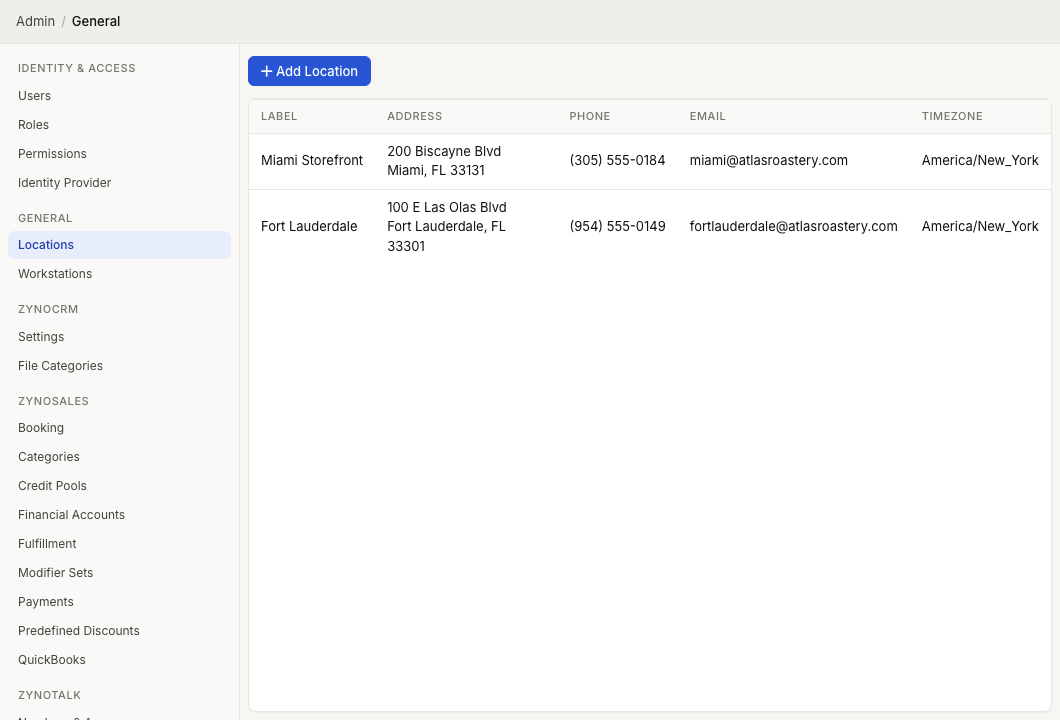
The Locations page shows each location with:
| Column | Meaning |
|---|---|
| Label | The location name shown throughout ZynoSuite |
| Address | The location contact address |
| Phone | The location contact phone number |
| The location contact email address | |
| Timezone | The time zone used for location-based scheduling and reporting |
Select a row to edit that location.
Add a location
- Open Admin > General > Locations.
- Select Add Location.
- Enter a Label.
- Enter Address Line 1, optional suite/unit details, city, state, and ZIP code.
- Enter Phone and Email if they apply.
- Choose the location Timezone.
- Select Create.
The phone number is required when ZynoSales features are enabled for the organization.
Edit a location
- Open Admin > General > Locations.
- Select the location row.
- Update the location fields.
- Select Save.
The General tab stores the location name, address, contact phone, contact email, and time zone.
ZynoTalk emergency calls
If your organization uses ZynoTalk and you have ZynoTalk access, the location editor includes a ZynoTalk tab.
Use the ZynoTalk tab to select Enable emergency calls to be made from this location and enter the emergency address that should be sent to emergency services when a 911 call is placed from an assigned extension. ZynoSuite can populate the ZynoTalk address from the General tab address, but you should verify that it matches the physical location of the phone.
After enabling emergency calls for a location, assign that location to each phone extension whose physical phone is at that address.
If ZynoSuite cannot verify the emergency address, it may show a suggested address and ask whether you want to use that instead. Once emergency calls are enabled for a location, the enable checkbox is locked on this screen.
Stripe terminal location registration
System administrators may see a location context-menu action named Register with Stripe. Most teams do not need to use this directly. Registering a card terminal can also register the location with Stripe automatically when needed.
See Card Terminals for the normal terminal setup flow.
Delete a location
- Open the location.
- Select the delete icon.
- Confirm the deletion.
Delete locations only after checking whether they are still used by workstations, card terminals, reporting, phones, or operational workflows.
Define the sites where your organization operates—used by sales, workstations, and reporting.