Appearance
Daily Closeouts
WebWorkstationMobileDaily Closeouts summarize sales and payments by business date and location. Use them to review totals, spot unbalanced days, inspect payment breakdowns, and generate closeout reports.
Permission required
You need ZynoSales reports view access.
Open daily closeouts
Open ZynoSales > Daily Closeouts.
Use the location selector to show closeouts for all locations or one location.
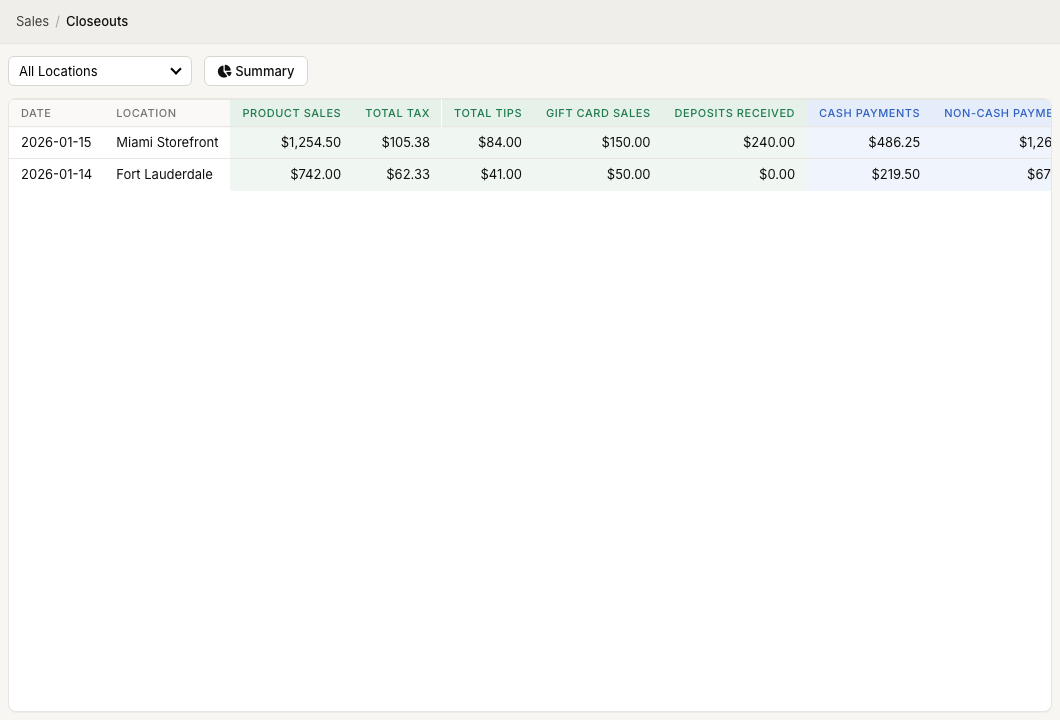
Closeout list
The table shows:
| Column | Meaning |
|---|---|
| Date | Business date |
| Location | Location for the closeout |
| Product Sales | Product revenue |
| Total Tax | Tax collected |
| Total Tips | Tips received |
| Gift Card Sales | Gift card value sold |
| Deposits Received | Deposits collected |
| Cash Payments | Cash collected |
| Non-Cash Payments | Card, check, gift card, and custom payments |
| Deposits Applied | Deposits used on completed sales |
Rows that do not balance are highlighted.
View closeout details
Select a closeout row to open the detail view. The detail view includes:
- Overview.
- Totals.
- Payment breakdown.
- Account breakdown.
- Tax breakdown.
Use the actions menu to View Report, E-mail Report, or View Deposits when deposits exist. E-mail Report asks for an email address and sends that closeout report.
Summary report
Select Summary from the Daily Closeouts toolbar to open Closeout Summary. Choose Start Date, End Date, and Location, then select Load.
After loading a summary, use the actions menu to View Report or Download PDF.