Appearance
QuickBooks Online
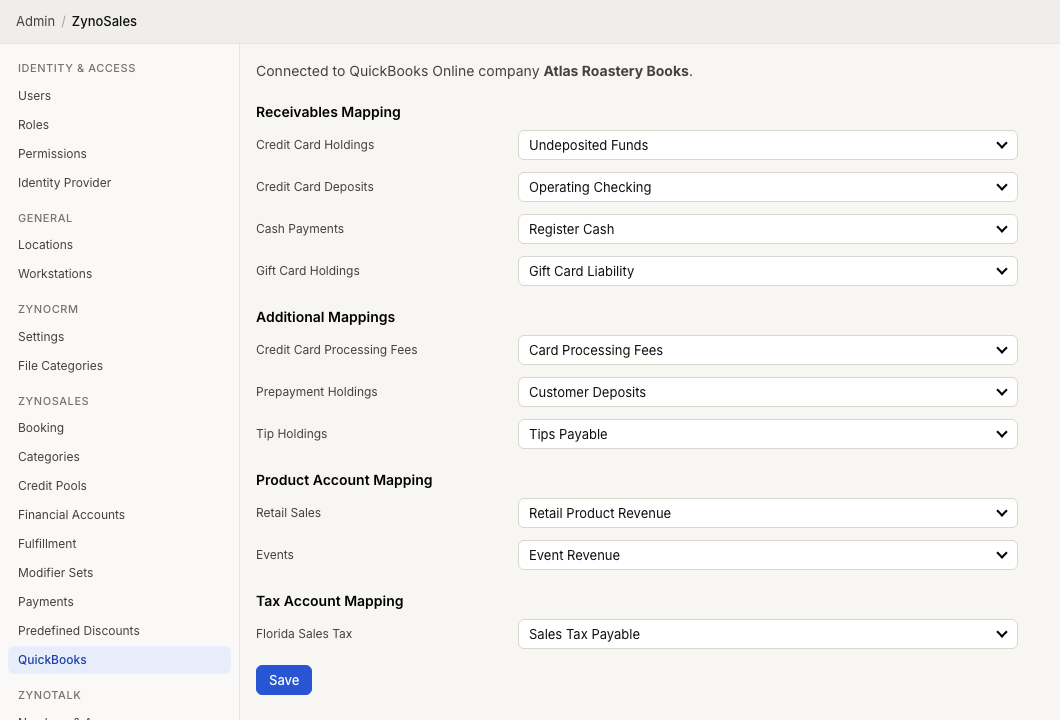
WebWorkstationThe QuickBooks Online integration connects ZynoSales financial activity to your QuickBooks company. Administrators connect QuickBooks and map ZynoSuite accounts to QuickBooks accounts.
Permission required
QuickBooks setup requires administrator access.
What the integration uses
QuickBooks mapping is based on:
- Stripe/card holding and deposit accounts.
- Cash payment account.
- Gift card holding account, when gift cards are enabled.
- Credit card processing fee account.
- Prepayment holding account.
- Tip holding account.
- Product financial accounts.
- Tax accounts.
Daily closeouts and financial account mappings are important inputs for accounting review.
Setup overview
- Open Admin > ZynoSales > QuickBooks.
- Select Connect to QuickBooks Online.
- Authorize the connection in QuickBooks.
- Confirm the connected company name.
- Map required receivables and fee accounts.
- Map product financial accounts and tax accounts where needed.
- Select Save.
See QuickBooks Integration for the setup fields.
Ongoing review
After setup, accounting users should periodically review:
- Daily Closeouts.
- Reconciliation.
- Financial account mappings.
- Stripe payment and fee activity.
- QuickBooks journal entries and account balances.